How to connect your HP printer to Wi-Fi and what you can do if you've lost the Wi-Fi credentials or are seeing poor network performance.
2. Credentials
In order to connect to a wireless network, you must have the required credentials. These are:
Wireless Network Name (SSID)
Wireless Network Key (Password)
Finding Network Credentials
Most wireless routers or gateways have a label with the default credentials. If the credentials aren't there, check the documentation that came with your device.
If your Internet Service Provider (ISP) installed the wireless router or gateway, they might have left you a setup sheet which may have the credentials.
3. Determine Best Connection Method
There are two basic methods used for wireless printer connection setup:
Wireless Setup Wizard - You will need access to the printer's display screen.
USB Setup - Requires a PC or Mac and printer software.
4. Connect to Wi-Fi via Panel
Depending on which model HP printer you have, the options you see or have access to may differ slightly from what these steps depict.
Tap your printer's control panel.
Tap Setup or Settings.
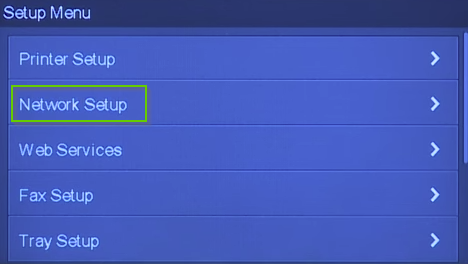
Tap Network Setup.
Select Wireless Settings.
Tap Wireless Setup Wizard.
Select your wireless network name in the list.
A prompt for the password will appear. Use the onscreen or physical keyboard to enter your Wi-Fi password.
5. Check Other Devices
To help troubleshoot the problem we should check if other devices can connect to the wireless network.
6. Retry Network and Password
Retry the network using the confirmed wireless network name and password.
7. Incompatible Routers
At this time, HP has not indicated that there are any compatibility issues with specific models of networking equipment on the market. To ensure that your specific networking equipment and all settings will work properly with your HP Printer, please reach out to the manufacturer directly for further assistance.
Some wireless routers broadcast a dual-band wireless signal and provide both 2.4GHz and 5GHz wireless networks. Your device may not see the 5GHz network, which is completely normal. Not all devices contain the antenna to communicate on the 5GHz band. Also, some routers broadcast guest networks that your device may not be able to connect to depending on your router's settings.
Type your product name, number, or serial number and click Find.
The latest drivers are usually marked Important. Select the latest one to Download.
Your download should begin. Depending on what browser you've used, you may have to click Run or Save to continue, or simply click the file that's downloaded to launch the installer.
10. Connect to Wi-Fi via Computer
Before starting the USB to Wi-Fi setup process, be sure to unplug the USB cable from the computer and printer. You will be asked to connect it later during the setup process.
Once your file is downloaded and the installer open, click Continue.
Click Next.
Check the Terms of Service box and then click Next.
Software will begin installing.
Select USB and then Next.
Connect the printer and your computer using the USB cable.
Once connected, select Yes, access the computer or router.
Type in your wireless password, select Yes, and click Next.
When prompted, unplug the USB from your printer.
Your printer is now installed on your Wireless Network.
11. Check Other Devices
To help troubleshoot the problem we should check if other devices can connect to the wireless network.
12. Retry Network and Password
Retry the network using the confirmed wireless network name and password.
13. What's next?
14. What's next?
15. What's next?
Remove Hidden Spyware In Minutes For Free
Detect and remove spyware, keyloggers, tracking cookies, and other
threats that slow down your PC or steal your data.
65+ Million Downloads
Spyware scanner with AI-powered detection engine + database
.png)