How to Fix Display Switching When Using Roku Ultra
Authored by: Support.com Tech Pro Team
1. Introduction
When your Roku streaming player along with other devices like a cable box or Blu-ray player are connected via HDMI with CEC enabled, it is possible that communication between the devices becomes unstable. Should this happen, your TV may get confused and switch to a different device when you try and control your Roku streaming player with your Roku remote. This guide will provide some troubleshooting steps that may resolve this issue.
2. Introduction
Consumer Electronics Control (CEC) is a feature of the HDMI standard that allows your HDMI-connected devices to work better together. By exchanging information such as the current volume, which device is providing audio and video, and which remote-control buttons are pressed, devices can often be controlled over HDMI with a single remote control.
CEC is known by several manufacturer-specific trade names. Below is a list of common trade names used for HDMI-CEC:
AOC: E-link
Hitachi: HDMI-CEC
LG: SimpLink
Mitsubishi: NetCommand for HDMI or Realink for HDMI
Onkyo: RIHD (Remote Interactive over HDMI)
Panasonic: HDAVI Control, EZ-Sync or VIERA Link
Philips: EasyLink
Pioneer: Kuro Link
Runco International: RuncoLink
Samsung: Anynet+
Sharp: Aquos Link
Sony: BRAVIA Link or BRAVIA Sync
Toshiba: CE-Link or Regza Link
Vizio: CEC
3. Check HDMI Cable
Check the HDMI cable ends and device ports and remove any foreign objects.
Check for cable damage. If it is damaged then it should be replaced.
Securely and firmly reconnect the HDMI cable between your devices.
Try plugging the HDMI cable ends into a different port on each device if possible.
Try using a different high-speed HDMI cable. Some cables are higher quality than others, a low-quality cable may impact your sound and video signal.
HDMI Cable
HDMI Port
4. Restart Device
To restart your device via power cycle:
If your device has buttons or a remote control, press the power button to turn it off.
Unplug it from the power outlet and wait for 10 seconds.
Plug it back into the power outlet, then turn it back on from the power button if it has on.
5. Bypass HDMI Device
If your Roku device is connected to your display through an audio/video receiver (AVR) or sound bar:
Or if you're using an HDMI hub or splitter:
Then connect the Roku device directly to the display, at least for troubleshooting purposes.
6. Toggle 1-Touch Play
Some Roku devices support a CEC feature called 1-touch play that tells your TV to automatically switch its active source / input to your Roku device when any button on your Roku remote is pressed.
If your Roku remote has volume up and volume down buttons, pressing either of them will not trigger 1-touch play.
To toggle 1-touch play on your Roku device, do the following:
Press the Home button on your Roku remote.
This will bring up the Home screen.
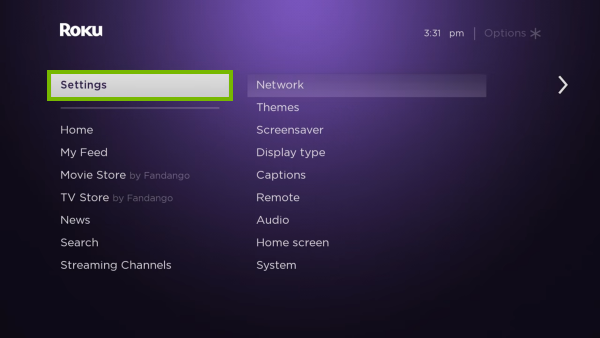
Go up or down and highlight Settings.
Go right then up or down and highlight System.
Go right then up or down to highlight Control other devices.
Go right to highlight 1-touch play and press OK to toggle the feature on or off.
If the feature is off, you will see an empty box next to its name;
If the feature us on, you will see a checkmark in the box next to its name.
7. Restart
Press the Home button on your Roku TV remote.
Scroll up or down and select Settings.
Press the right arrow button and select System.
Press the right arrow button and select Power.
Press the right arrow button and select System Restart.
Press the right arrow button and select Restart.
Press the OK button to confirm.
8. What's next?
9. Toggle HDMI-CEC
In order for CEC to work, it needs to be enabled in the TVs settings.
To toggle this feature on or off you need to access your TVs menu, options or settings using the buttons on the side of the unit or using its remote. This varies by manufacturer and TV model. The feature also comes under a variety of different names. Please consult your TVs documentation to find out what its name is and how to toggle this feature on or off.
Remove Hidden Spyware In Minutes For Free
Detect and remove spyware, keyloggers, tracking cookies, and other
threats that slow down your PC or steal your data.
65+ Million Downloads
Spyware scanner with AI-powered detection engine + database
.png)