How to Fix Lines or Shaky Picture Element Smart TV
Authored by: Support.com Tech Pro Team
1. Introduction
If you experience issues with your Element Smart TV where the video signal is either shaking or displaying horizontal and/or vertical stripes, you may have an issue with interference, defective or loose cabling, or a malfunctioning source device. This guide will take you through troubleshooting steps that will attempt to resolve these issues.
2. Interference Check
Sometimes image quality can be affected by local interference, such as an electrical appliance or power tools. Appliances like microwaves, refrigerators, freezers, or power tools like drills and saws can cause interference even while not running.
Turn off temporarily any of the above devices and check if the issue persists.
If that fixes it, try and move that device further from the TV.
3. Check Cables
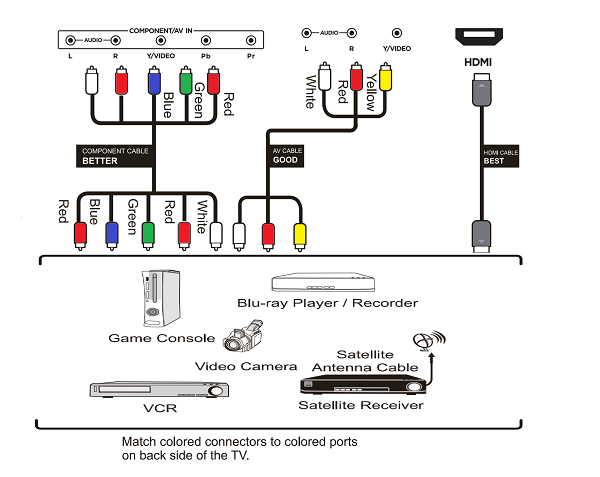
The most common types of cables you may encounter when looking at the devices connected to your home system.
HDMI
Component Video - make sure each cable is in the correct spot.
Composite Video - make sure each cable is in the correct spot.
Start with the box you're attempting to get the picture from, like your Cable box or DVD/Blu-ray player.
On the back of the box, check to see what kind of cables are connected and trace them to see what and where they are plugged into. While checking, make sure each cable is securely connected and pushed in firmly all the way.
In this example, the HDMI cable that comes from the cable box is connected to the HDMI2 input on the TV. This means the TV would need to be set to HDMI2 to see the picture from this cable box.
Check that all cables are securely connected and take note of the names of the ports that those cables are plugged into so those specific inputs can be tested.
4. TV input channel or source
Use your TV's remote to make sure that your TV input channel or source is set to the correct HDMI port.
5. Power Cycle Component
This is a general guide for rebooting Home Theater or Surround Sound components. This can be any component within your Home Theater system including your TV, A/V Receiver, Cable Box, DVD or Blu-Ray player, etc. Most devices can be power cycled by using their remote controls. However, certain unresponsive devices may need to be unplugged from power if the remote does nothing or does not completely shut the component off.
To power cycle a component using its remote control:
Press the power button on the remote control of the component you need to power cycle.
The component should turn off and can then be turned back on at any time using the same button on the remote control.
If power cycling via the component's remote control does not work:
First, attempt to turn off the component normally by pressing it's power button.
Next, unplug the component from power.
Wait at least 30 seconds.
Plug the component back into power and attempt to power it back on.
6. What's next?
Remove Hidden Spyware In Minutes For Free
Detect and remove spyware, keyloggers, tracking cookies, and other
threats that slow down your PC or steal your data.
65+ Million Downloads
Spyware scanner with AI-powered detection engine + database
.png)