Home theater systems are comprised of numerous components that are all connected to a single screen. Depending on the hardware your system contains, the settings involved to get the correct picture on-screen can sometimes be a little complex. If you've turned on your system, but do not see a picture on-screen, don't panic. This guide will take you through common things to check when you're unable to get the correct picture on-screen.
Tools You'll Need:
A paperclip
iPhone charging cable
Access to a computer with iTunes installed
Any other non-consumable tools needed
Comment out tools section if no tools are necessary
-->
Supplies You'll Need:
Zip ties
Any other consumable supplies
Comment out supplies section if no supplies are necessary
-->
Before You Begin:
You must have access to a computer with iTunes installed.
You must have that thing for the other thing so you can do the thing.
Each individual prereq should have its own box like this. Not all will contain multiple links.
Comment out prerequisites section if no prereqs are necessary
-->
2. Check Television Input Settings
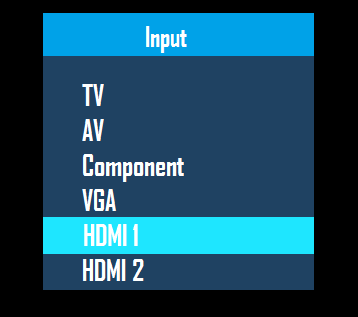
Your TV and A/V Receiver components may need to be using different input or source settings in order to be able to find picture properly. This will be different in every home theater setup depending on the cables that are being used, and the different components that you have installed.
If you've got no video, there could be an issue with your system's inputs. You'll need to find out which cables are plugged in where and make sure your television is set to use that input.
For example: If your cable box is plugged into the 'HDMI 1' port of your television, you would select the HDMI 1 input in order to see picture from your cable box.
Locate the Input or Source button on your TV remote.
Aim the remote at the TV and press the Input or Source button to begin cycling through the available inputs on the screen.
When you've reached the input option you'd like to test, just stop pressing the input button. The TV will switch to the input option you've landed on automatically after a few seconds.
Your system is most likely connected on an HDMI cable, enabling both sound and video to travel to the television with one cable.
3. Check Receiver Input Settings
Checking the AVR's input selections is a bit more involved than doing it on the television.
To select the input source from the AV receiver itself
Press input button you wish to use.
The Display will show the currently selected input.
To select the input source using the remote control
Select one of the Labeled buttons to choose a source.
Common navigation controls for your AV receiver:
Setup - Displays setup menu screen
Home - Displays home menu screen
Arrows â–²/â–¼/â–º/â—„ - Move the focus in the menu screen Enter - Selects the focused menu / item
Return - Returns to the previous menu or screen
Depending on your individual AV receiver's model, your remote's button layout may vary slightly from the images above.
4. Check Video Cabling Connections
After checking your inputs and settings and finding no luck in fixing your lack of video, you should make sure your cables are seated correctly.
Before moving your equipment or checking any cabling, make absolutely sure that your A/V Receiver and any other components that are currently on are fully powered off.
Check the following cable connections to ensure that all devices are connected properly and securely.
The connection from your TV to your home theater receiver.
The connection from your Home theater receiver to the source device you want to watch.
If you're using HDMI for one connection and component for another, the component video quality will be noticeably less than the HDMI.
Make sure to check the cables you're using for damage as well. If your cable is damaged it is possible it won't carry any data and your system won't even read it.
5. Still Not Getting Video?
If after checking to make sure your cables are okay and not damaged, you still have no video on your television, there may be an issue with the device you're getting input from.
If you're using cable television, there may be an issue with the provider.
Remove Hidden Spyware In Minutes For Free
Detect and remove spyware, keyloggers, tracking cookies, and other
threats that slow down your PC or steal your data.
65+ Million Downloads
Spyware scanner with AI-powered detection engine + database
.png)