Resolve common issues problems with your Ecobee Switch+'s Wi-Fi connection.
Before We Begin:
Have access to your Ecobee Switch+.
2. Check Other Devices
Check your home's internet connection by testing with another device such as your smartphone, computer, game console, streaming device, etc.
3. Status Check
Your Ecobee Switch+ has a built-in command to get the connectivity status of your device, and help solve common problems.
Push and hold the Mute button for seven seconds.
Listen carefully to what your Ecobee Switch+ says.
4. Check Environment
If other wireless devices are connected to the network and functioning properly, chances are the router is OK. It's possible there is an environmental issue. Do you have a portable wireless device (Smart Phone, Tablet, Laptop, etc.) that you can put in the same area to test and see if that device's wireless connection still functions as intended in that location?
5. Reboot Router
To reboot a router simply unplug the power cord, make sure that all the lights went off, keep it powered off for 30 seconds then plug the power cord back in.
6. What's next?
7. Range Check
The device needs to be within a reasonable range of the router in order to connect and have the best connection speeds.
In general, in most homes, you can be up to 30 feet from your router for a decent connection.
From 30' to 50' away, the speeds will be slower, and may drop occasionally, but it should be usable.
Greater than 50' away, and the signal will most likely be too weak to overcome interference. The speeds will be slow, and the connection may be sporadic.
The above numbers are approximates only. Optimal range may vary based on router make and model.
8. What's next?
9. Relocate Router Check
Your router may need to be relocated to a more centralized location in order to provide better coverage for all your devices.
Good Placement
Bad Placement
10. Router Relocation
Since this appears to be a range issue that can be resolved by putting the router in closer proximity to the device's intended use area, we recommend moving the router to a more centralized location.
11. Range Extender
If wireless signal is not reaching your device, and relocating your router or the device itself to be in closer proximity is not possible or doesn't resolve the issue, a great way to boost wireless signal without replacing existing equipment is to acquire and install a range extender. Range extenders work with your existing wireless router as a type of wireless repeater used to expand the reach of wireless signal in your home.
12. Reboot
Push and hold the main button on your Ecobee Switch+.
Continue to hold the main switch for five seconds.
Wait for the voice prompt to say "Restart Device".
Press the main button one time.
Your Ecobee Switch+ will restart, and should be ready to use again in a few minutes.
13. Forget Wi-Fi Network
Push and hold the main button on your Ecobee Switch+ for five seconds.
Wait for the voice prompt to say "Forget Wi-Fi Network".
Press the main button one time.
14. Register Device
Open the Ecobee app.
Sign in, or create your account.
To Create a New Account
Select Create a New Account.
Enter your Name, Email Address, and select a password and confirm it by entering it twice. Read the Terms & Conditions carefully, then confirm you accept them by placing a check mark in the box. Finally, select Create Account.
To Sign in with an Existing Account
Fill in your Email address, and your Ecobee password. Then select Sign In.
Select Register Your Device.
Select ecobee Switch.
You will be reminded to verify the Switch+ is glowing amber. Select Get Started.
In order to setup your Ecobee Switch+ properly, the app will need location access. Select Allow Location Access.
Select Allow or OK to authorize ecobee to use the device's location.
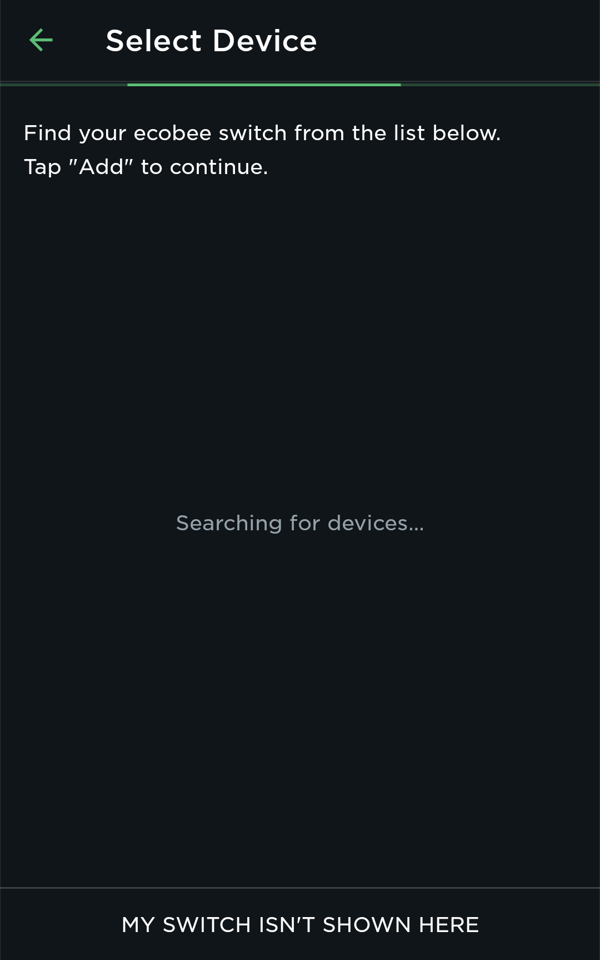
The App will scan for your ecobee Switch+.
Your ecobee Switch+ will appear in the list. Select your switch and tap Add to add your device to the app.
Follow any additional instructions that may appear on-screen to complete device registration.
15. Factory Reset Check
The next step is to factory reset your Ecobee Switch+, then set the device up from the beginning again.
16. Factory Reset
Press and hold the main button on your Ecobee Switch+ for 5 seconds.
Wait for the voice prompt to say "Reset to factory settings".
.png)