This Guide will help you Format the Insta360 GO Action Camera
Insta360 GO the world's smallest hands-free action camera with FlowState Stabilization & Auto editing. Easily shoot hyper-lapse, slow-motion and barrel roll
2. Via the GO app
Via the GO app
Connect to your phone via the Charge Case or via Bluetooth
Open the GO app, enter Settings -> Select camera storage-> tap "Format"
3. Via a Windows computer
Via a Windows computer
Place GO into Charge Case, align the charging points of the camera and Charge Case
Connect to your computer via USB
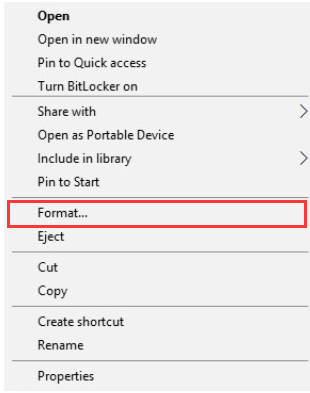
Click 'My Computer' -> right click 'Removable disk' -> click 'Format'
Select 'FAT32' in File system, '128 kilobytes' in Allocation unit size -> click 'Start' to format
4. Via a Mac computer
Via a Mac computer
Place GO into Charge Case, align the charging points of the camera and Charge Case
Connect to your computer via USB. 3. Run 'Disk Utility' applications on mac -> select GO disk -> click 'Erase'
Select 'FAT32' in File system to erase
Remove Hidden Spyware In Minutes For Free

Detect and remove spyware, keyloggers, tracking cookies, and other
threats that slow down your PC or steal your data.
65+ Million Downloads
Spyware scanner with AI-powered detection engine + database