People forget things. It's normal. But there's nothing like forgetting your Mac computer's password and locking yourself out of it.
While the password hint can be helpful, it doesn't always work to jog your memory.
This guide will help you reset your password if you have an Apple ID. Unfortunately, if you don't have access to these accounts you'll need to factory restore your device.
2. Apple ID vs Local Account
Most up to date Macs are tied to your Apple ID. You can use it to reset the password to your Mac. If you sign into your Mac with an email, you have an Apple ID.
If you do not use an Apple ID, you will not see the following screens on your Mac.
An example of an Apple ID shown on an iPhone:
3. Reset Your Password Using Apple ID
Try guessing your password until the message saying If you forgot your password, you can reset it using your Apple ID.
Click the arrow next to Apple ID.
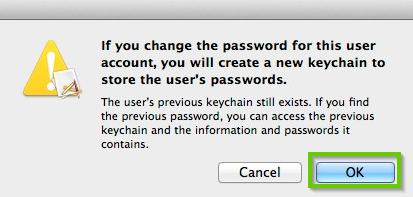
A popup with information on the Apple Keychain will appear. Click OK.
Type in your Apple ID information and click Reset Password.
Type in your new password information.
You'll be asked to restart your Mac.
4. Guided Path not helpful.
5. Escalate to PTE
If you are a PST, follow the Escalation Process to PTE.
6. What's next?
7. Reset Password Assistant
If FileVault is turned on, you might be able to reset your password using the Reset Password assistant:
Wait up to a minute at the login screen, until you see a message saying that you can use the power button on your Mac to shut down and start up again in Recovery OS.
If you don't see this message, FileVault isn't on and you cannot use this method.
Press and hold the power button until your Mac turns off.
Press the power button again to turn on your Mac.
The Reset Password window will appear. Select I Forgot My Password.
Select your User Account.
Type in your new password information.
When done, click Restart.
If you were able to reset your password with the Reset Password assistant, log in to your account using your new password.
Remove Hidden Spyware In Minutes For Free
Detect and remove spyware, keyloggers, tracking cookies, and other
threats that slow down your PC or steal your data.
65+ Million Downloads
Spyware scanner with AI-powered detection engine + database
.png)