Multiple Sony XB40 speakers can be linked together for Stereo or "Double mode."
Power on both speakers you wish to link.
Press and hold the Add button for 3 seconds on the first speaker until you hear a beep.
Press and hold the Add button for 3 seconds on the second speaker until you hear a beep.
The speakers will now be linked together.
6. Phone Calls
Making phone calls
Make sure your mobile device is paired.
Initiate a phone call from your mobile device.
Press the Play/Pause button to end the call.
Receiving phone calls
Make sure your mobile device is paired.
When a phone call is received, press the Play/Pause button to answer the phone call and then speak into the speaker.
Press the Play/Pause button to end the call.
7. Audio Playback Introduction
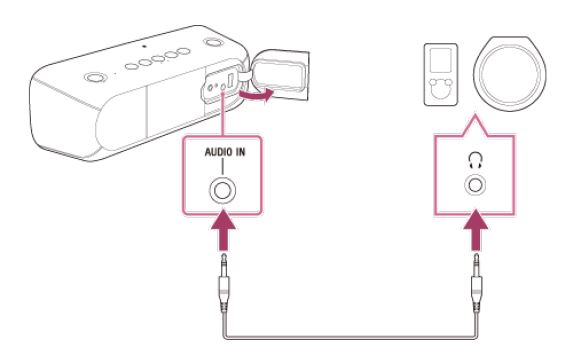
The Sony XB40 supports playback via Bluetooth and via an audio cable with a stereo mini plug (not included). The following steps will walk you though playback of audio to your device.
8. Stereo Mini Plug
Plug in a stereo mini plug into your source device and your wireless speaker.
Make sure both the source device and speaker are set to a moderate volume for the best listening experience.
9. Audio Playback
From any app that plays audio, you can now open and stream music to your speaker.
From a mobile device
From a computer
10. Extra Bass
You can enable or disable the extra bass feature by pressing the Extra Bass button on the speaker.
11. Introduction
Bluetooth technology allows you to stream audio from your computer or mobile device to your Bluetooth capable audio device. It has a range of approximately 30 feet. Your streaming device and Bluetooth audio device need to be paired with one another successfully before streaming can take place.
12. Audio Playback
From any app that plays audio, you can now open and stream music to your speaker.
From a mobile device
From a computer
13. Extra Bass
You can enable or disable the extra bass feature by pressing the Extra Bass button on the speaker.
14. Pairing Bluetooth devices to your Sony XB40 Wireless Speaker
.png)