Clicking this button will open a new guide that will provide you with steps to resolve your issue.
6. Manual Operation
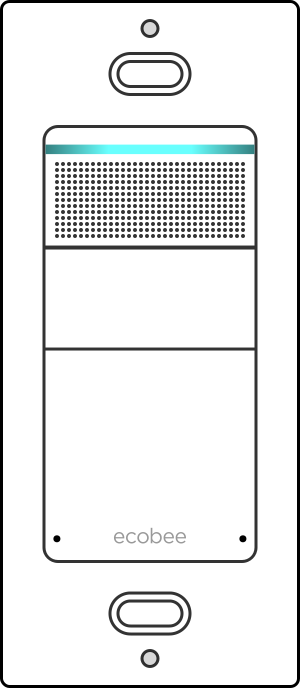
To turn the light on or off, you can operate the switch manually by pushing the main button on your Ecobee Switch+.
You can also use the Alexa commands: "Alexa, turn [switch name] on." or "Alexa, turn [switch name] off."
7. Smart On and Off
Your Ecobee Switch+ will automatically switch off your lights after a set time, using built-in sensors to tell when the room is empty.
Open the Ecobee app.
Select Smart Features, then Smart Off.
Select how long the lights should wait before turning off when the room is empty.
8. Indicator Lights
There is a light bar at the top of your Ecobee Switch+ that changes, to indicate some basic information about the switch.
Listening & Active
Light Blue Your Switch+ is listening to you speak.
Thinking & Speaking
Light Blue, Pulsing Darker Blue Your Switch+ is thinking, or speaking to you.
Microphone Off
Red Your Switch+ microphone is off, so it cannot hear you to respond. Use the Ecobee app on your smartphone or tablet to turn it back on if you wish.
Notification
Yellow Your Switch+ has a notification, and is trying to get your attention. Check the Ecobee app on your smartphone or tablet to see the message.
Pairing
Amber If solid, your Switch+ is ready to pair to a new device.
If flashing, your Switch+ is actively pairing to a device.
9. Use Night Light
Night Light is a smart feature that helps you locate your ecobee Switch+ on the wall when it's dark. It automatically turns on the small light located below the switch when the room is dark, and automatically turns it off when there's enough light in the room to see again.
The ecobee Switch+ can operate indoor or outdoor lighting and the Night Light feature can be enabled for either of them.
To change the type of lighting your ecobee Switch+ operates:
Tap the Info symbol ( circle around lower case i ) in the top right.
And choose the type of lighting your ecobee Switch+ operates.
To enable or disable Night Light:
Toggle the switch on the right to turn the feature on or off.
10. Use Do Not Disturb
Do Not Disturb is an option of the Smart On feature. Smart On automatically turns on your light when you walk into a dark room, using occupancy and daylight sensors. If Do Not Disturb is enabled, Smart On doesn't activate between its set times
The Smart On feature is only available when your switch is set to operate indoor lighting.
If the switch is set to operate outdoor lighting, you can change the operation mode if you tap the Info symbol ( circle around lower case i ) in the top right then select indoor lighting.
You need to have Smart On enabled for Do Not Disturb to take effect. Toggle the switch on the right to the on position.
Tap where it says Smart On to enter the configuration settings.
Go to Do not disturb.
Toggle the switch on the right to turn the option on or off and set the activation time interval.
11. Basic Commands
Alexa answers your basic questions using the Internet to find you the answers, and perform simple tasks.
Go ahead and try out these commands:
Alexa, what's the news?
What's the traffic like?
Alexa, set a timer for 20 minutes.
Play music by David Bowie.
Alexa, what movies are playing?
Find me a nearby sushi restaurant.
Alexa, create a to-do list.
Alexa, create a shopping list.
Add toilet paper to my shopping list.
Alexa, how hot is the sun?
12. Example Music Commands
Your Amazon Alexa device responds to your voice, and can perform a variety of actions to play music for you.
Example Music Commands
Simply say these commands near your Alexa device.
"Alexa, play some music."
Your Alexa device will use your previous play history, as well as various charts, to choose some music for you and play it.
"Alexa, play [song] on my [other device]."
If you have multiple Alexa-enabled devices, Alexa will accept the command from wherever it hears you, and then play music using the other speaker system.
If you want Alexa to play on a certain device, rather than the Alexa device itself, specify it like this each time.
"Alexa, play music by [artist]."
Your Alexa device will try to find music by the artist you say.
While playing "Alexa, next."
Skip the song currently playing, and move on to the next.
"Alexa, Restart."
Your Alexa device will restart the song you're currently listening to.
"Alexa, play [station] on [service]."
Alexa will use the service you mention, and try to play the station you mention.
Alexa understands a huge number of different commands. If you're not sure, simply try saying what you want, and it will try to help.
Remove Hidden Spyware In Minutes For Free
Detect and remove spyware, keyloggers, tracking cookies, and other
threats that slow down your PC or steal your data.
65+ Million Downloads
Spyware scanner with AI-powered detection engine + database
.png)