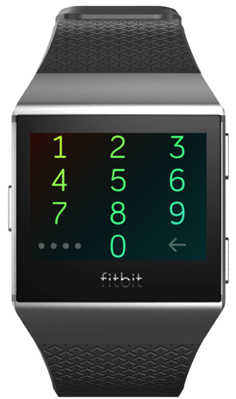
A pass code is like a password that keeps your device secure. To help keep your Fitbit device secure, you can turn on the device lock in the Fitbit app. Once enabled you'll be prompted to enter a personal 4-digit PIN code to unlock your device.
If you set up Fitbit Pay, the device lock is turned on automatically and you’re prompted to set a code.
Tools You'll Need:
A paperclip
iPhone charging cable
Access to a computer with iTunes installed
Any other non-consumable tools needed
Comment out tools section if no tools are necessary
-->
Supplies You'll Need:
Zip ties
Any other consumable supplies
Comment out supplies section if no supplies are necessary
-->
Before You Begin:
You must have access to a computer with iTunes installed.
You must have that thing for the other thing so you can do the thing.
Each individual prereq should have its own box like this. Not all will contain multiple links.
Comment out prerequisites section if no prereqs are necessary
-->
2. Enable Device Lock
You'll use your Smart Device and the Fitbit App to enable the Device Lock.
Launch Fitbit.
Tap the Today tab.
Tap your Profile Picture.
Select your device. In this case we are selecting the Versa.
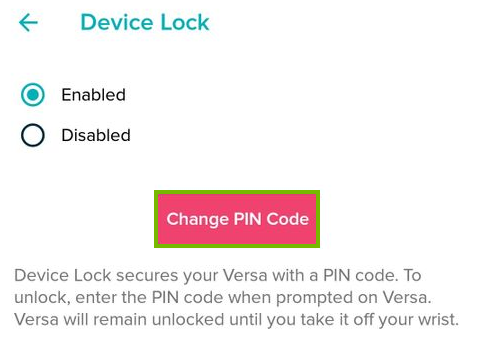
Tap DeviceLock.
Select Enable and input your pin number.
3. Reset or Change Device Lock
To reset or change the device lock you'll also use the Fitbit App. You'll need to reset it, if you've forgotten it, or just change it if you feel its too weak.
Launch Fitbit.
Tap the Today tab.
Tap your Profile Picture.
Select your device. In this case we are selecting the Versa.
Tap DeviceLock.
Select Change PIN Code.
Type in your new PIN.
4. Unlock With My Phone
If you enter an incorrect PIN code 10 times, you're prompted to unlock your Fitbit device in the Fitbit app.
Launch Fitbit.
Tap the Today tab.
Tap your Profile Picture.
Select your device. In this case we are selecting the Versa.
Tap DeviceLock.
Select Change PIN Code.
Type in your new PIN.
Remove Hidden Spyware In Minutes For Free
Detect and remove spyware, keyloggers, tracking cookies, and other
threats that slow down your PC or steal your data.
65+ Million Downloads
Spyware scanner with AI-powered detection engine + database
.png)